tcpMDT
[PRO] Find Nodes - MDT26

Find Nodes
 | Command to execute in the CAD |
|---|---|
Vertical menu | MDT26 > Networks > Nodes > Find Nodes |
Ribbon menu | Networks > Nodes > Search |
Command line |
This option enables us to easily locate a node from all those existing in the drawing by name. To do so, when executing the command, the following dialogue box will appear with the existing networks in the drawing and the nodes for each of them.
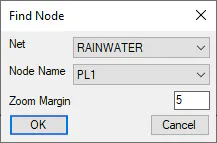
Zoom Margin: We specify the size of the zoom in the location of the node.
We select the network and the node we wish to locate and click on the OK button. A zoom will automatically be executed on the node in question.