
Support
How do I determine what type of protection has been supplied to me?
How do I determine what type of protection has been supplied to me?
Detailed
To resolve issues related to the protection system, it is first button... to correctly identify the type of protection: hardware/software, Sentinel/LDK technology, and whether it is single-user or network.
Answer
Hardware or Software
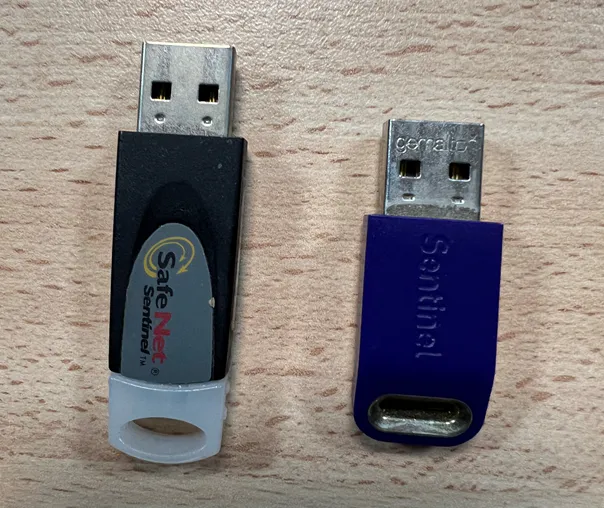
If you received USB Device like those in the Image, it is Hardware type protection.
If you received an Code or File to activate the LICENSE, it is Software protection.
Sentinel or LDK Technology
If you have Software protection: The technology is always LDK.
If you have Hardware protection:
-
If the key is similar to the one on the Texts of the image, the technology is Sentinel.
-
If the key is similar to the one on the Final Point reference::
- Connect the key to a USB port
- Open Windows Device Manager
- Expand "Universal Serial Bus controllers"
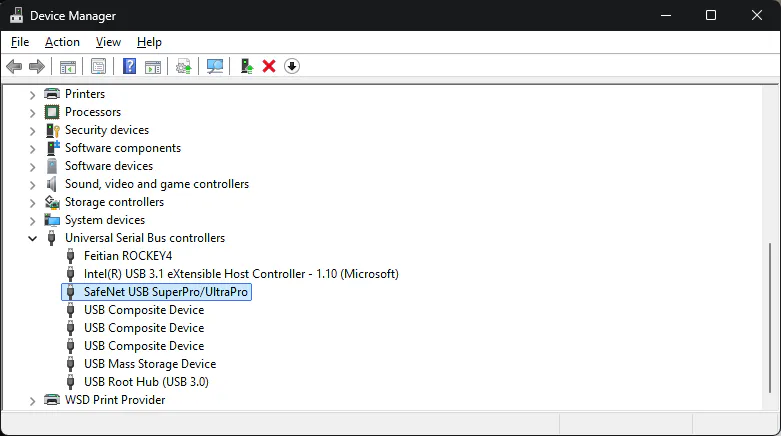
Earthworks by Terrain Elevation: - If "SafeNet USB SuperPro/UltraPro" appears → Sentinel Technology - If no new Device appears → LDK Technology
Draw Points Verification
It is first button... that the type of protection supplied matches the one installed in the software. See: FAQ-02: How do I verify which protection is installed?
In case of discrepancy, contact Technical Support.
Classify points by levels: General Information All: All protection systems Type: Basic