
Support
How to check the serial number of my license?
How to check the serial number of my license?
Detailed
The Serial Number uniquely identifies your LICENSE and must match between the installed software and the protection key.
Applicable to
- hardware protection system with Sentinel technology
Step 1: Check serial number in the software
Method A: From AutoCAD
- Run the CAD
- Press F2 to activate the text window
- Look for the MDT copyright message:
XXX - Serial Number: 149
MDT v25.0 - AutoCAD 2025
Method B: From the menu
- Run MDT25 > ABOUT Tcp-MDT
- The Serial Number appears in the Centre of the window (in brackets)
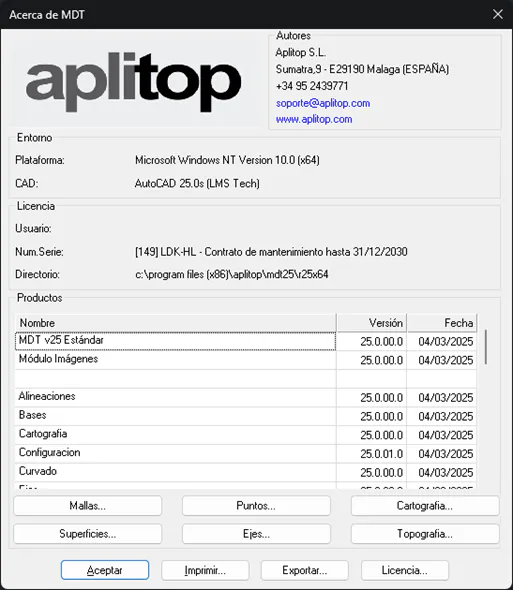
Example: Serial Number = 149
Step 2: Verify exclamation mark
⚠️ If an exclamation mark (!) appears after the number:

Means: You have installed a version of MDT Top to the one you purchased.
Solution: Contact the Administration Department to Update your license.
Step 3: Check serial number on the key
- Open the MDT25 installation FOLDER:
- Remarks:
C:\Archivos de programa (x86)\Aplitop\MDT25 - Enter the Driver FOLDER
- Run USBDiag.exe
- A window will appear with key information:
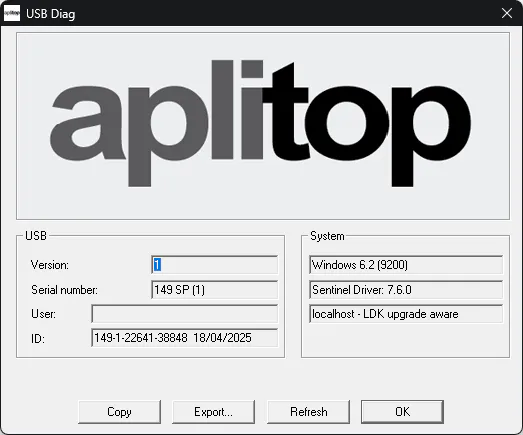
Example: Key Serial Number = 149
Step 4: Compare both numbers
| software | Key | Status |
|---|---|---|
| 149 | 149 | ✅ Correct |
| 149 | 150 | ❌ Do not match |
| 149 | --- | ❌ Damaged key |
If they do not match
Cause: The installation files do not correspond to the protection key.
Solution: Contact the Administration Department: [email protected]
If dashes appear (---)
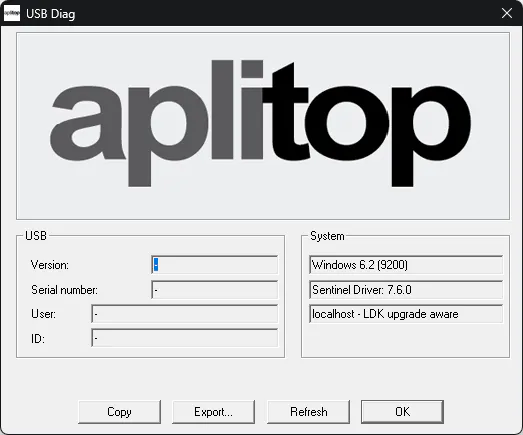
Cause: The key is possibly damaged.
Solution: Contact the Administration Department for replacement.
Tips
💡 Write down your Serial Number in a safe place for future consultations and Reference with Support.
Category: Troubleshooting - Diagnosis Level: Intermediate TOOLS: USBDiag.exe