
tcpMDT
Convert long section - MDT25
11.9 Convert Long Section
From this command we can generate a cross-section file from a profile. When this option is executed, the following window will appear.
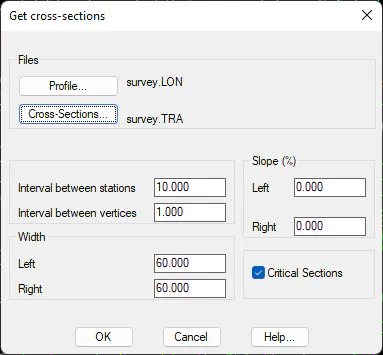
Profile: File from which the conversion is carried out.
Cross-sections: Name of the new file to generate the cross-sections.
Interval between stations: Interval of separation of stations that will exist in the new cross-section.
Interval between vertices: Distance and separation that will exist between each one of the vertices of each cross-section cut.
Left width: Left width of the cross-sections from the horizontal alignment.
Right width: Right width of the cross-sections from the horizontal alignment.
Left Slope: Slope percentage from the horizontal alignment to be applied to the left cut. It is understood that 0% equals a totally horizontal cut.
Right Slope: Slope percentage from the horizontal alignment to be applied to the right cut. It is understood that 0% equals a totally horizontal cut.
Critical Sections: Indicate whether we wish to create cuts equivalent to the critical section cuts.