
tcpMDT
Convert simple template - MDT25
11.10 Convert Simple Template
This command is very useful for generating a cross-section file with a cross-section template that can be quickly associated without the need to carry out the entire template definition process.
To do this, at first the program requests the natural terrain cross-section to serve as a pattern for generating the profiles, then the following window is displayed, the characteristics of which are described below.
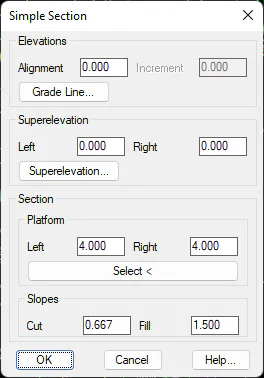
Elevations: We can opt to set the horizontal alignment height or on the contrary select a grade line from which we wish to obtain each station height. In the box Increment we can set a positive or negative variation of the height in regard to that calculated from the grade line.
Superelevation: The possibility to introduce a fixed superelevation along the horizontal alignment or have the information on the superelevations read from the file corresponding to superelevations.
Section: To indicate the basic characteristics of our section.
-
Platform: We have two options to define the platform:
-
Indicating the width on either side of the platform.
-
Selecting a polyline which represents the platform; this polyline may feature as many vertices as necessary. There should be one vertex in the position of the horizontal alignment.
-
Slopes: Corresponding cutting and fill slopes.
Last, the program requests a cross-section file to transfer the information generated from the previous data.