
tcpMDT
Input cross sections - MDT25
11.12 Input Cross-Sections
This command aims to make the manual input of a series of cross-section profiles easier, in addition to their possible modification. When the command is executed, a file is requested, which can either be new (the window will be empty) or an existing file (a list will appear), and then the following dialog box is displayed.
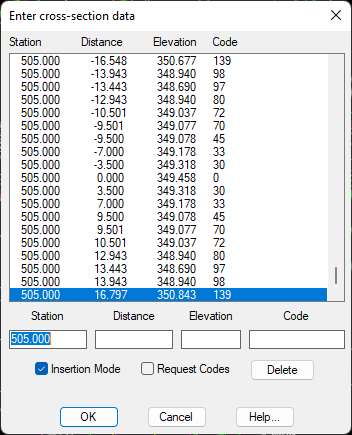
Insertion Mode: If command is not activated, the cut selected will be changed for the one entered using the keyboard. Should it be selected, a new cut will be entered with the data keyed in.
Delete: Deletes the element marked on the list.
Insertion Mode: If command is not activated, the cut selected will be changed for the one entered using the keyboard. Should it be selected, a new cut will be entered with the data keyed in.
Request Codes: If this command is not activated, the code to be entered through the keyboard will not be requested and the code of the cut selected previously will be automatically assigned. If, on the contrary, the command is selected, one should enter the code using the keyboard.