
tcpMDT
[PRO] Generate Multiple Proposed Terrain - MDT26

Generate Multiple Proposed Terrain
 | Command to execute in the CAD |
|---|---|
Vertical menu | MDT26 > Roads/Segments > Generate Multiple Proposed Terrain |
Ribbon menu | Roads > Utilities > Multiple |
Command line |
This option operates in the same way as the previous option, only in this case, a folder is selected, and the command will automatically generate the modified terrain from all the segments it finds in the selected folder.
When executing the command, the window below is displayed for selecting the folder location of the segments to generate.
Once the working folder is selected, the window below is displayed to indicate the modified terrain to generate:
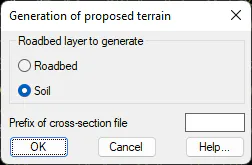
On one side the user selects whether to generate the roadbed or the soil and also the prefix of the cross-section file. The command will generate a cross-section file for each segment found in the folder. These files will take the name of the corresponding segment using the text introduced in the corresponding field as a prefix.