
tcpMDT
[PRO] Generate Superelevations from Cross Sections - MDT26

Generate Superelevations from Cross-sections
 | Command to execute in the CAD |
|---|---|
Vertical menu | MDT26 > Roads/Segments > Superelevations > Create Superelevations from Cross-Sections |
Ribbon menu | Roads > Superelevations > Create from Cross Sections |
Command line |
The same as the previous command, this option generates a superelevation, but instead of the usual practice of using a horizontal alignment, this option enables generating the superelevation from the information existing of the cross-sections.
The command will analyze the vertices of each previously indicated cut and from the slope in regard to the position of the horizontal alignment of each one of them it calculates the left and right superelevation.
The first thing it requests is the cross-section file from which to generate the superelevation, then the following window is displayed to manage how the new superelevation file will be built.
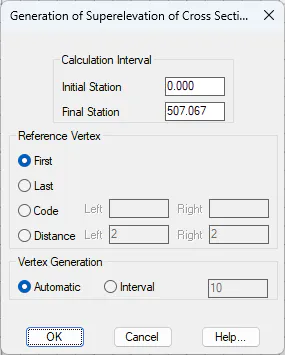
Calculation interval. Used to indicate between which stations the superelevation will be calculated.
Reference Vertex: Used to indicate the reference vertex of the cross-section to serve as a reference in generating the superelevation. There are three possibilities:
The first vertex on both sides from the position of the horizontal alignment.
The last vertex on both sides from the position of the horizontal alignment.
The first vertex on each side from the centerline position whose code, on the corresponding side, matches the code specified in this option.
Distance: The superelevation is generated from the slope calculated at the specified offset distance from the centerline. Different distances may be defined for the left and right sides.
Vertices Generation: A superelevation vertex will be generated for each cross-section cut or according to the interval specified.
Once the window is validated it will request the superelevations file in which to save the information.