tcpMDT
[PRO] Import Superelevations - MDT26

Import Superelevations
 | Command to execute in the CAD |
|---|---|
Vertical menu | MDT26 > Roads/Segments > Superelevations > Import Superelevations |
Ribbon menu | Roads > Superelevations > Import |
Command line |
This command is used to convert superelevations files from other surveying software to MDT format.
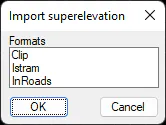
When executing this command, the following window is displayed showing the distinct conversions currently available. Once one of them has been selected it will request the original files and corresponding destination files.
New formats are continuously incorporated with this command according to the needs of our clients.