
tcpMDT
Add Points - MDT26
Add Points
 | Command to execute in the CAD |
|---|---|
Vertical menu | MDT26 > Surfaces > Modify Surface > Add Points |
Ribbon menu | Surfaces > Edit > Add Points |
Command line |
This command allows one to add surveying points to the current surface. Firstly, a dialog box is displayed where the program requests the origin of the vertex elevations to be inserted.
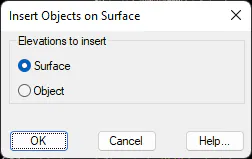
The options available are Surface, by means of which the new vertices will have the current surface's elevation, and Object, which inserts a point having its own elevation. Once the appropriate option has been chosen, a Points Selection dialog box is displayed, where one has to select the points to be added.