
tcpMDT
Water Drop - MDT26
Water Drop
 | Command to execute in the CAD |
|---|---|
Vertical menu | MDT26 > Surfaces > Utilities > Water Drop |
Ribbon menu | Surfaces > Utilities > Drop |
Command line |
This command is used to draw a polyline with the approximate route of a drop of fluid on the surface. First, the following window is displayed
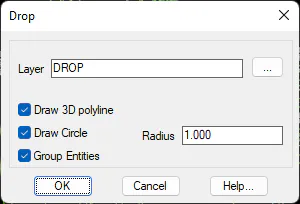
Next, the program requests an initial point for the route and draws a polyline to represent the drop. Checking the option Draw Circle makes it easier to distinguish the initial route point, because the program draws a circle around the position. With the option Group Entities, the polylines and the circles drawn are grouped, so that when one of the entities is selected, both are selected automatically. This way can be easily deleted.