tcpMDT
Change Elevations - MDT26
Change Elevations
 | Command to execute in the CAD |
|---|---|
Vertical menu | MDT26 > Surfaces > Modify Surface > Change Elevations |
Ribbon menu | Surfaces > Edit > Change Elevations |
Command line |
When this command is executed, the following options appear on the command line:
Elevation: Allows you to enter an elevation from the keyboard. Then, by selecting coordinates in the drawing, the program will assign that dimension to the nearest vertex of the surface.
Increment: Allows you to enter an elevation increment from the keyboard. Then, by selecting coordinates in the drawing, the program will increase the elevation of the nearest vertex of the surface by that amount.
Select: Allows you to select a contour line so that the vertices of the surface can be assigned the same elevation as the contour line.
Copy: Enters a loop in which two vertices are requested consecutively, assigning the elevation of the first vertex to the second.
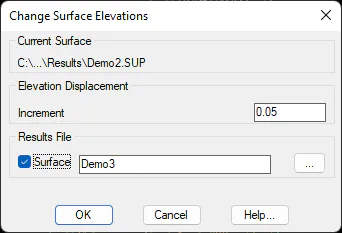
Global: a dialog box appears in which you can specify an elevation offset that will be applied to all vertices of the current surface. You can also choose between modifying the surface only in memory, or, by activating the "Results File" option, creating a new surface file with the resulting modification.