tcpMDT
Convert Drawing - MDT26
Convert Drawing
 | Command to execute in the CAD |
|---|---|
Vertical menu | MDT26 > Surfaces > Create Surface > Convert Drawing |
Ribbon menu | Surfaces > Create > Convert Drawing |
Command line |
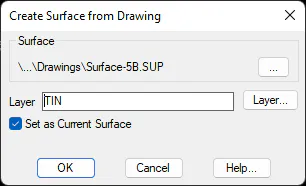
This command allows one to create a surface file from a triangulation drawn with line-type objects. This command can be used if one wishes to import a triangulation whose associated surface file has been lost or if the drawing has been manually modified and one wishes to accept the changes made to it. It can also be used to import a triangulation created using another program.
Firstly, the program requests a file in which to store the surface. It then shows displays dialog box where one specifies the Layer where the objects are drawn. If one wishes the program to assume them as the current surface, the Set as Current Surface check box should be activated.