
tcpMDT
Delete Area - MDT26
Delete Area
 | Command to execute in the CAD |
|---|---|
Vertical menu | MDT26 > Surfaces > Delete Area |
Ribbon menu | |
Command line |
This tool serves to create a gap in the current surface. In addition to changing the triangulation, the program can perform the following operations:
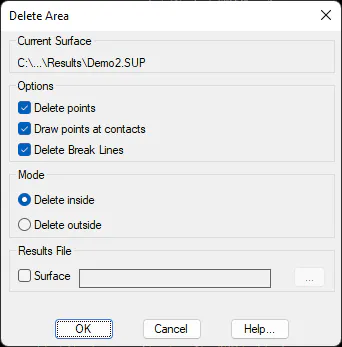
Delete Points: Surveying points within the area concerned are deleted.
Draw Points at Contacts: When the surface is changed, the surface's triangles in contact with the perimeter of the area concerned are cut. This process creates new vertices on the surface. Activating this option also creates the corresponding surveying points.
Delete Break Lines: The break lines within the area concerned are cut and/or deleted. Should there be contour lines, they are also considered in this process.
The Mode box allows one to choose whether the area concerned is inside or outside the polyline. Once the options to be used have been chosen, the program requests the closed polyline that defines the area upon which one wishes to act.
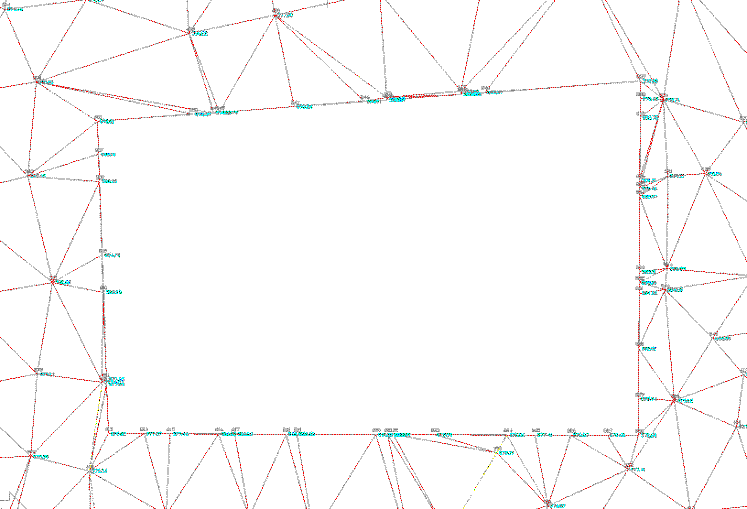
Example of the result of emptying by areas