tcpMDT
Import Surface - MDT26
Import Surface
 | Command to execute in the CAD |
|---|---|
Vertical menu | MDT26 > Surfaces > Import Surface |
Ribbon menu | Surfaces > Create > Import |
Command line |
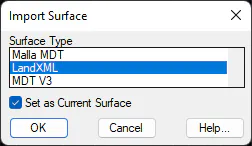
This command enables file conversion with a surface (triangulation) created with other programs. First a dialog box appears for selecting the file type to import, and then it requests the destination file. The option Set as Current Surface loads the resulting surface in the memory automatically.