
tcpMDT
[PRO] Compare Vertical Alignment - MDT26

Compare Vertical Alignment
 | Command to execute in the CAD |
|---|---|
Vertical menu | MDT26 > Vertical Alignments > Utilities > Compare Vertical Alignments |
Ribbon menu | V.Alignments > Utilities > Compare |
Command line |
This command is used to obtain a list comparing two previously selected vertical alignments. Executing the option displays the following window for establishing the criteria for creating the list:
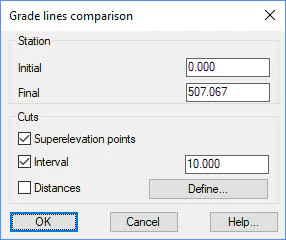
Initial: Initial station from which the comparison list is to be made.
Final: Station up to which we want the list.
Superelevation points: If this option is checked, the comparison list includes the vertices of each vertical alignment selected.
Interval: Interval at which the list is executed.
Distances: Additionally, to compare stations determined from the vertical alignment, the desired stations can be inserted in this option with the Define button.
After pressing okay on the dialogue box, the corresponding list appears in which we have the additional possibility of printing the list with the different printing options the application provides.
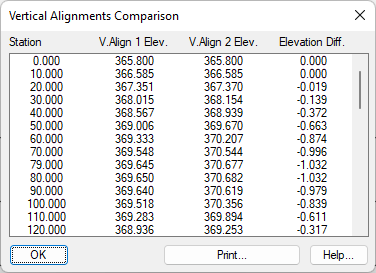
can be enabled to specify any special characteristics of the format to which one wishes to export.