
tcpMDT
[PRO] Enter Vertical Alignment - MDT26

Enter Vertical Alignment
 | Command to execute in the CAD |
|---|---|
Vertical menu | MDT26 > Vertical Alignments > Enter Vertical Alignment |
Ribbon menu | V.Alignments > Create > Enter |
Command line |
This command is similar to the previous one with the difference being that it allows you to introduce a new vertical alignment. It is also possible to select an existing gradient in order to modify it or add new vertices.
When executing this command, you request the grade file, either a new file or an existing one and it will show its listing.
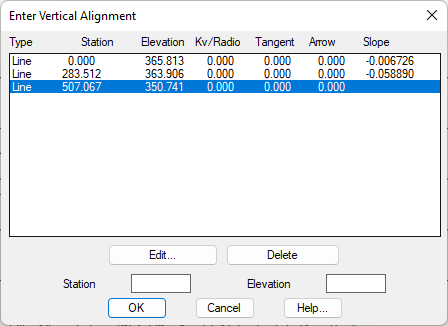
Edit: Edit any vertex with the option of modifying the curve if it is an intermediate vertex.
Delete: Remove the selected vertex.
In addition to the Station and Elevation fields, you can enter different vertices of the vertical alignment, by just pressing the "enter" key the entered data will be automatically validated.