
tcpMDT
Create Issue - MDT26
 | Command to execute in the CAD |
|---|---|
Vertical menu | MDT26 > BIM > Create Issue |
Ribbon menu | BIM > Issues > Add |
Command line |
Create Issue
This option will create an issue to which a capture of the drawing that we currently have open in the CAD will be automatically associated.
Initially it asks us for the BCFZIP file, which can be a new file or an existing one and then the following window will appear where the details of the issue will be specified.
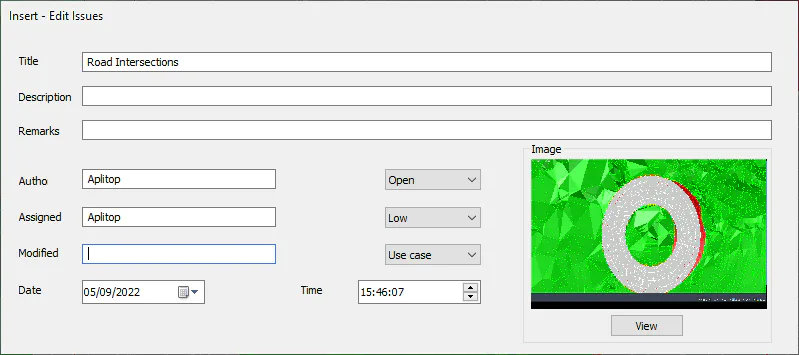
Title: Brief description describing the incident.
Description: Message indicating the action to be taken in the incident.
Comment: Description that complements both the title and the previous description.
Status: The incidence, over the course of its life cycle, could be found in five different states.
Open
In progress
Closed
Reopened
Active
Priority: Different priorities can be established to the incidence: Urgent, High, Normal and Low.
Type: Incidence classification:
Use case
Request
Question
Comment
Failure
Additionally, you can specify the date and time of the issue, these fields will be automatically filled with the current date and time.