
tcpMDT
Export LandXML - MDT26
 | Command to execute in the CAD |
|---|---|
Vertical menu | MDT26 > BIM > Export LandXML |
Ribbon menu | BIM > BIM > Export LandXML |
Command line |
Export LandXML
This command allows us to convert the various types of existing DTM files to the LandXML format.
Initially, the following window appears, where we must manage the various files to be converted. Then its characteristics are shown.
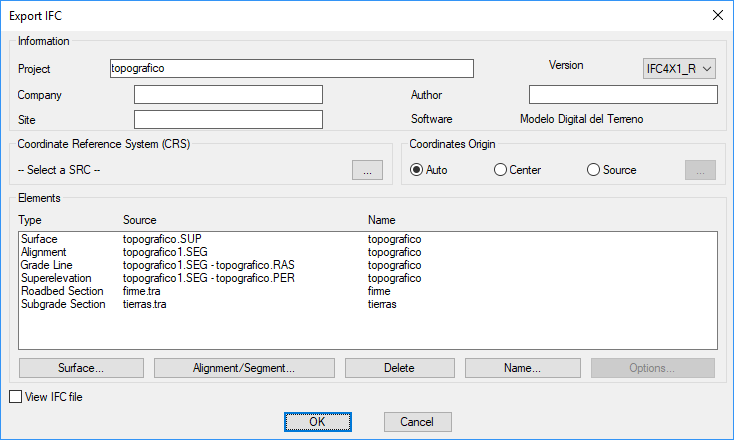
Delete: If we press this button, it will be removed from the list to convert the element that is selected.
Name: We establish the name of the corresponding DTM file to be created, by default it will take the name of the selected XML file with the corresponding extension.
Points: This lets you select the different point files that you want to convert.
Surfaces: Likewise, you select the surface files to be converted.
Horizontal alignment/Segment: In this case, you can select either a horizontal alignment or segment. In case of selecting a segment, the program will automatically introduce the horizontal alignment, the cross-section and vertical alignment if they are contained in the segment
Cross section: Selection of cross section files to be exported.
See XML document: If you select this option, once the conversion is finished, the generated XML file will be opened by default in the operating system's default browser.
Export plot drawings: In the case of existing DTM plot drawings, if you select this option, they will be exported automatically.