
tcpMDT
Import XLS Data - MDDT26
 | Command to execute in the CAD |
|---|---|
Vertical menu | MDT26 > BIM > Import XLS Data |
Ribbon menu | |
Command line |
Overview
The Import XLS Data command bulk-loads BIM property values from an Excel file previously generated by the Export XLS Template command. Once imported, the values are available as the third priority level in the property value resolution chain during IFC export: above the Pset default value and the MDT type override, but below the individual instance override.
The data is persisted in <project_directory>\BIM\xls_data.xml and remains active across successive exports until reimported or manually removed.
> [!important] Only templates generated by tcpMDT are accepted
> The selected file must be a template generated by Export XLS Template. It is automatically detected by the presence of the MDT_META and MDT_BIM_DATA sheets. A manually created Excel file is not valid and the command rejects it with a warning.
Value priority chain (highest to lowest)
Instance override — assigned with Assign Properties to Object (
IFC_ASIGOBJ)MDT type override — assigned with Assign Properties to MDT Types (
IFC_ASIGPROP)Imported XLS value ← this command
Value calculated by MDT
Pset default value
Complete workflow
In the Property Sets command, mark the desired properties with origin Imported XLS.
Run Export XLS Template to generate the Excel file with the corresponding columns.
Fill in the values in Excel for each project object.
Run Import XLS Data (this command) to load the values.
Run Export IFC: each object will receive its individual value in the IFC file.
Import XLS Data Window
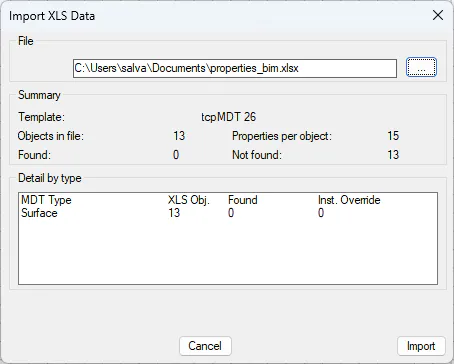
File section
File path — Text field showing the full path of the selected
.xlsxfile. The user can type the path directly or use the...button to browse.
... button — Opens the operating system file selector filtered to
.xlsxfiles. When a valid file is selected, the dialog analyses it automatically and fills in the Summary and Detail by type sections without writing anything to disk.
Summary section
Populated automatically when a valid file is selected. Displays:
Template and Date — Template generator (
tcpMDT 26) and export date read from theMDT_METAsheet.
Objects in file — Total number of data rows present in the
MDT_BIM_DATAsheet of the Excel file.
Properties per object — Number of property columns (columns D onwards) in the file.
Found — Number of objects in the file that exist in the active project and will receive values on import.
Not found — Objects present in the file that could not be located in the active project. These objects are silently skipped during import without interrupting it.
Detail by type section
List with one row for each MDT type present in the Excel file. Each row shows:
MDT Type — Type name (Surface, Alignment, Earthwork, Road, etc.).
Obj. XLS — Number of objects of that type in the file.
Found — How many of those objects were located in the active project.
With instance override — Number of objects of that type that already have an active instance override (assigned with
IFC_ASIGOBJ) on any of the same properties carried by the XLS. If this value is greater than 0, the overwrite warning is shown and the import requires additional confirmation.
Overwrite warning
Appears below the list when any object in the file has active instance overrides on the same properties. It states the number of affected objects and warns that importing will replace those instance overrides with the XLS values.
Main buttons
Cancel — Closes the dialog without writing anything. If the file was analysed but not imported, no project file is modified.
Import — Starts the import. If any instance overrides are affected, it opens the confirmation window before writing any data. Remains disabled while no valid file has been loaded.
Confirm Import Window
Appears when clicking Import only when one or more objects in the file have active instance overrides on the same properties carried by the XLS.
Cancel — Returns to the main dialog without importing. No file is modified.
Continue — Confirms the import and writes the values to
BIM\xls_data.xml. After completing, displays the summary message on the command line.
Imported data storage
The imported values are persisted in:
<active_drawing_directory>\BIM\xls_data.xml
The BIM\ folder is created automatically if it does not exist. The XML file accumulates values by object; reimporting with a new XLS updates only the objects present in the new file without removing values for objects not included in it.
Command messages
"The selected file is not a valid tcpMDT 26 template." — The file does not contain the
MDT_METAandMDT_BIM_DATAsheets in the expected format. The summary is not shown and the Import button remains disabled.
"The template belongs to a different project. Objects not found will be ignored. Continue?" — The project GUID in the template does not match the active project. The user decides whether to continue; objects not located are silently skipped without interrupting the import.
"N objects have instance overrides on the same properties. Importing will overwrite those instance overrides. This action cannot be undone." — Text of the confirmation window when instance overrides are affected.
"Import complete: N objects updated, M ignored." — Final summary on the command line when import completes. Shows how many objects received values and how many were skipped because they could not be found in the project.
Related commands
Export XLS Template (
IFC_EXPXLS) — Generates the Excel file that this command imports. Both commands always work with the same template format; a manually created XLS is not compatible.
Property Sets (
IFC_PROPSETS) — Determines which properties are marked with originImported XLSand therefore appear as columns in the template. If no property has that origin, the template has no useful data columns.
Assign Properties to Object (
IFC_ASIGOBJ) — Manages instance overrides (layer 4), which have higher priority than XLS values. When this command detects that an instance override and an XLS value coincide on the same property, it warns the user before overwriting.
Export IFC (
IFC_EXPORTAR) — During export, the engine applies the imported XLS values as the third level of resolution in the priority chain.
Reference generated for tcpMDT 26 — IFC-PropertiesSet