
tcpMDT
Object Classification - MDT26
 | Command to execute in the CAD |
|---|---|
Vertical menu | MDT26 > BIM > MDT Object Classification |
Ribbon menu | |
Command line |
We have the possibility to assign to MDT objects codes from one or several classification systems.
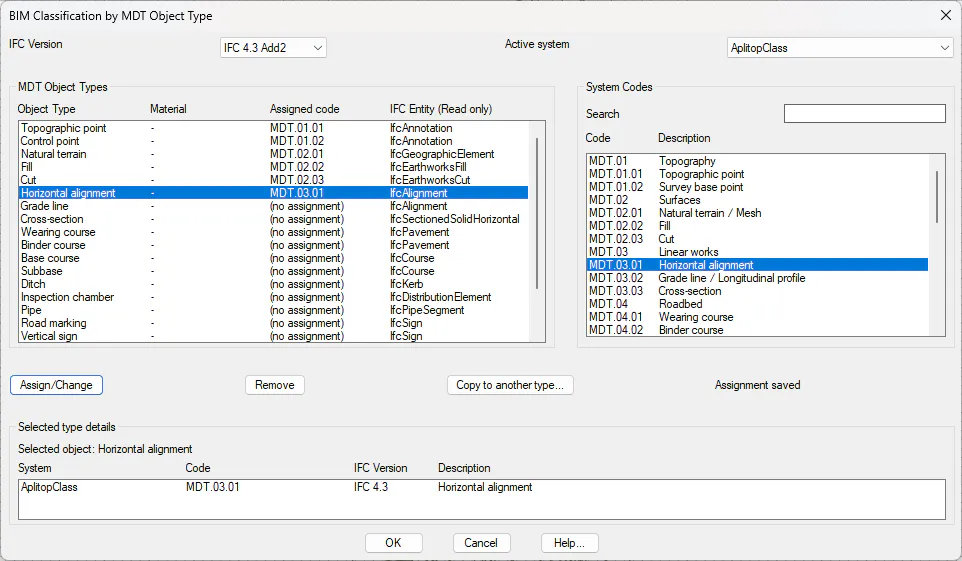
In the BIM Classification by MDT Object Type dialog, we can choose the IFC Version, and the active classification system to perform the assignments.
MDT Object Types, a list of the objects used in MDT, the material (only for pavements), the code assigned of the selected entity and the IFC entity that corresponds to it according to the selected schema.
System Codes, lists of the codes and the description of the selected classification system.
By pressing the Assign/Change button, a relationship is created between the element selected in the first list and the one selected in the second list. Pressing it a second time on an object that already has an assignment will update that assignment with the new element selected in the second list.
By pressing the Remove button, it deletes the assignment of the element selected in the first list.
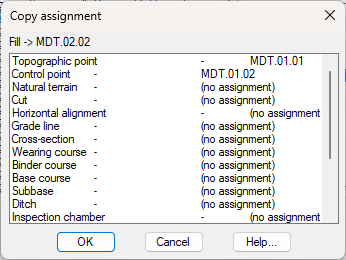
By pressing the Copy to another type button, it shows a dialog with a list of the MDT Objects that have assignments, so you can select an element, and the assignment of that element will be copied to the Object selected in the main dialog.
In the Details of the selected type, we can see the system, Code, IFC Version and description of all the assignments that the selected object has in the MDT object types list.