
tcpMDT
Alignments. Edit Vertex - MDT26
Edit Vertex
 | Command to execute in the CAD |
|---|---|
Vertical menu | MDT26 > Alignments > Edit Alignment > Edit Vertex |
Ribbon menu | H.Alignments > Edit > Edit Vertex |
Command line |
This utility allows curved or clothoid-type alignments to be modified. In order to do so, the alignment to be modified must be selected and the program displays the following dialog box:
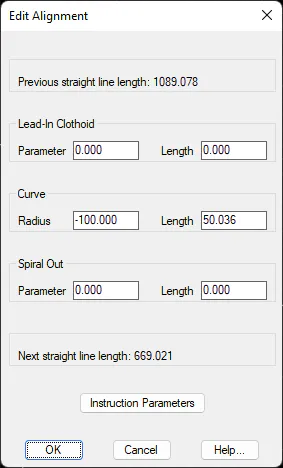
If any of the values are changed, the program automatically recalculates the rest. Possible overlaps are also checked.
The Instruction Parameters button attempts to assign the Parameter suggested by the Highway Instructions with regard to the alignment's Radius and depending on the kind of road and the project's speed, which were specified when the alignment was created (see Alignments> Superelevations > Superelevation Table command). This standard considers safety and aesthetic criteria. Should it not be possible to assign the parameters laid down, the program indicates it and leaves the previous values unchanged.