tcpMDT
Annotate Alignment - MDT26
Annotate Alignment
 | Command to execute in the CAD |
|---|---|
Vertical menu | MDT26 > Alignments > Annotate Alignment |
Ribbon menu | H.Alignments > Drawing > Annotate |
Command line |
This tool is used to dimension an alignment following standard criteria. The program requests the horizontal alignment drawn on screen and then activates a dialog box. where the characteristics of the marks to be drawn should be entered.
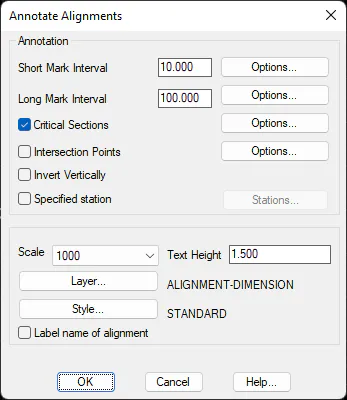
Invert Vertically: Allows the texts' labelling direction to be changed in the alignment's dimensioning.
Intersection Points: Activating this option the program draws two straight lines tangent to the entrances and exits of the curves.
Scale: Sets the scale value for the marks and texts to be drawn.
Text Height: Value of the height of the texts to be labelled. This value will be proportional to the preceding scale value.
Layer: The layer in which marks and texts are to be drawn is designated.
Style: The style of the texts to be labelled. If the button is clicked, a list will be displayed containing the different styles available for the current drawing.
Specific Stations: This option is used to mark stations of particular interest.
Label name of alignment. This option will label the name of the alignment near the alignment's origin.
Short Mark Interval
Sets the interval between each short mark to be drawn. If the Options button is activated, the interval's configuration can be modified.
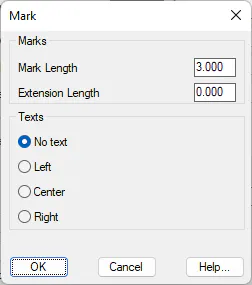
Mark Length: Length of short mark.
Extension Length: If texts are drawn, this value sets the mark's extension in the direction of the text attached.
Texts: It is possible either to draw the text to the Left or to the Right, or not draw the text (No text).
Long Mark Interval
Sets the interval between each long mark to be drawn. If the Options button is activated, the interval's configuration can be modified.
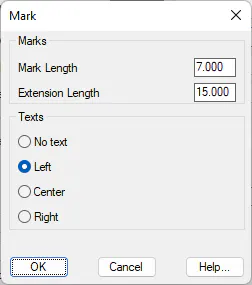
Mark Length: Length of long mark.
Extension Length: If texts are drawn, this value sets the mark's extension in the direction of the text attached.
Texts: It is possible either to draw the text to the Left or to the Right, or not draw the text (No text).
Critical Sections
If this control is activated, MDT will mark the alignment's critical sections. Similarly, the alignment's drawing may be configured.
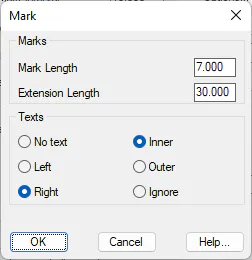
Mark Length: Length of the mark situated at unique points.
Extension Length: If texts are drawn, this value sets the mark's extension in the direction of the text attached.
Texts: It is possible either to draw the text to the Left or to the Right, or not draw the text (No text). To dimension curve or clothoid-type sections, dimensioning may be performed either in their Outer or its Interior.
Final Result
Once the dialog box has been validated, MDT will proceed to dimension the alignment selected. An example of the command in use can be seen below.