
tcpMDT
Trim Alignment - MDT26
Trim Alignment
 | Command to execute in the CAD |
|---|---|
Vertical menu | MDT26 > Alignments > Edit Alignment > Trim Alignment |
Ribbon menu | |
Command line |
This command allows you to shorten the length of an alignment. Once the alignment is selected, either graphically or indicating a file, a window appears with the kilometric points of the ends of the alignment.
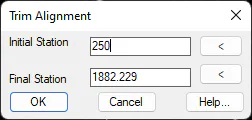
Once the Initial and/or the Final Stations have been modified, either by typing the exact station or using the corresponding "<" button, accepting the window will modify the alignment.