
tcpMDT
Convert - MDT26
Convert
 | Command to execute in the CAD |
|---|---|
Vertical menu | MDT26 > Alignments > Utilities > Convert Alignment |
Ribbon menu | H.Alignments > Utilities > Convert |
Command line |
With this command we can convert alignment files from other programs or with other different formats, in order to import them into MDT or export them to other programs. When executing the command, the following dialog appears, which we will now describe:
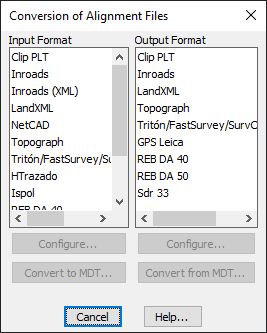
If we select any format from the Input Format list , the bottom button of Convert to MDT will be automatically enabled. Pressing this button will request the source file containing the alignment in the original format and then the output file where the alignment information will be dumped, already in the MDT format. Optionally, you can enable the Configure button where you could specify some special features that the selected format had.
Likewise, if we select any format from the list of Output Format, the bottom button of Convert from MDT will be automatically enabled. By clicking on it, it will ask us for the source file that contains the MDT axis and then the output file where the alignment information will be dumped, already in the selected format. Optionally, you can enable the Configure button where you could specify some special features that the format you want to export to.