
tcpMDT
Distances Between Alignments - MDT26
Distances Between Alignments
 | Command to execute in the CAD |
|---|---|
Vertical menu | MDT26 > Alignments > Utilities > Distances Between Alignments |
Ribbon menu | H.Alignments > Utilities > Alignment Distance |
Command line |
This tool provides users with information regarding distances equivalent stations existing on two different horizontal alignments. Firstly, the two horizontal alignments must be selected. Then the following dialog box is displayed:
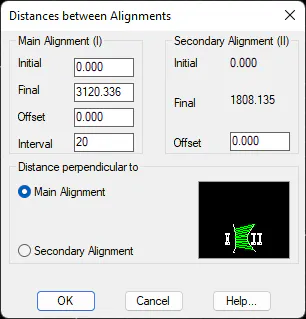
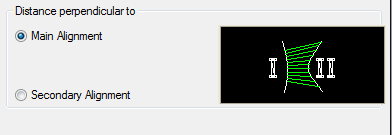
There are two ways of working or making the calculation, depending on whether Main Alignment or Secondary Alignment is selected.
Main Alignment: In this case the distances to horizontal alignments are calculated normally with regard to the first horizontal alignment selected and until the intersection with the second horizontal alignment.
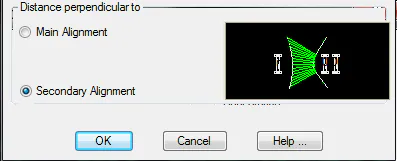
Secondary Alignment: If this option is selected the distances will be perpendicular to the second horizontal alignment selected.
The Initial Station and the Final Station should be indicated for the main horizontal alignment (the first one selected), along with its Offset with respect to the alignment and the calculation Interval. In addition, the Offset with regard to the horizontal alignment is entered for the secondary alignment.
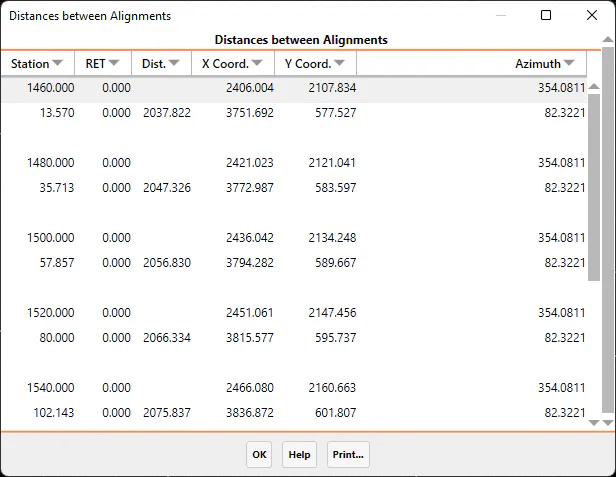
The results are grouped two by two in lines: one for the first alignment and the other for the second. In the first, the station, the X and Y coordinates, and the azimuth are indicated. In the second, the station, the distance between the horizontal alignments at that station, the X and Y coordinates, and the azimuth at that point are indicated.