tcpMDT
Invert Alignment - MDT26
Invert Alignment
 | Command to execute in the CAD |
|---|---|
Vertical menu | MDT26 > Alignments > Edit Alignment > Invert Alignment |
Ribbon menu | H.Alignments > Utilities > Invert Alignment |
Command line |
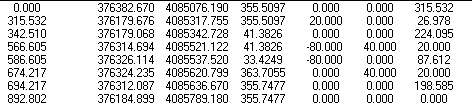
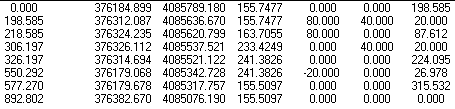
This tool changes the direction of the beginning of an alignment drawn on screen, inverting the distances to origin, as well as changing azimuth and radius signs.
Example: Horizontal alignment before and after inversion