
tcpMDT
Draw Curvature Diagram - MDT26
Draw Curvature Diagram
 | Command to execute in the CAD |
|---|---|
Vertical menu | MDT26 > Alignments > Utilities > Draw Curvature Diagram |
Ribbon menu | H.Alignments > Drawing > Draw Curvature |
Command line |
This command is used to draw the curvature diagram associated with an alignment. For this purpose, it will initially request the alignment properly designated on screen or from a file. Next, the below window will appear which is used to configure the drawing parameters.
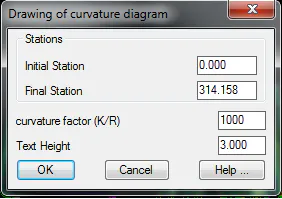
Initial Station: Initial station of the drawing.
Final Station: Final station of the drawing.
Curvature Factor: Exaggeration factor in the representation of the curvature diagram.
Text Height: Height of the texts that are marked next to the curvature diagram.
See this type of diagram below.
