
tcpMDT
Convert from Cross Sections - MDT26
Convert from Cross-sections
 | Command to execute in the CAD |
|---|---|
Vertical menu | MDT26 > Profiles > Create Profile > Convert from Cross-Sections |
Ribbon menu | L.Sections > Utilities > Convert from Cross Sections |
Command line |
This utility is used to obtain a longitudinal profile file from cross-sections. The process transforms the stations of the cross-sections into distances, to which the axis elevation of each profile is assigned, directly or interpolated.
When you run this option, the following window will appear in which you will specify the cross-sections file, the long section file to be created and the distance to the axis.
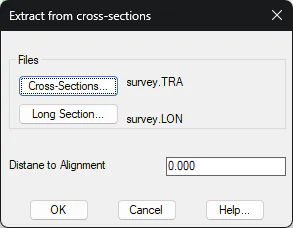
The longitudinal will be generated from the specified "Distance to Alignment". Considering negative values for the left of the alignment and positive values for the right of the alignment.
.Example: Cross-sections and long section obtained from these. In this case, generated at zero distance, that is, in the alignment position.
0.000 -18.520 43.887 TRI | 0.000 45.318 Alignment |
|---|---|
0.000 -12.750 44.291 TRI | 20.000 45.634 Interpolated |
0.000 -8.769 44.612 TRI | 40.000 48.201 Alignment |
0.000 0.000 45.318 Alignment | |
20.000 -17.105 44.611 TRI | |
20.000 -16.140 44.670 TRI | |
20.000 -11.339 44.055 TRI | |
20.000 -3.832 45.434 TRI | |
20.000 9.316 46.121 TRI | |
40.000 -14.961 43.283 TRI | |
40.000 -11.047 43.949 TRI | |
40.000 -9.458 44.159 TRI | |
40.000 -5.009 47.678 TRI | |
40.000 0.000 48.201 Alignment | |
40.000 3.462 47.503 TRI | |
40.000 11.611 48.129 TRI | |
40.000 17.226 48.435 TRI | |
40.000 19.677 49.094 TRI |