
tcpMDT
Long Section. Move Stations - MDT26
Move Stations
 | Command to execute in the CAD |
|---|---|
Vertical menu | MDT26 > Profiles > Edit > Move Station |
Ribbon menu | L.Sections > Edit > Move Station |
Command line |
This option allows us to change the stations or distances to origin of a long section file. After selecting the file to be altered, the program displays its initial station. If a different number is entered, the program takes it as the origin and changes all the values in the file's first column.
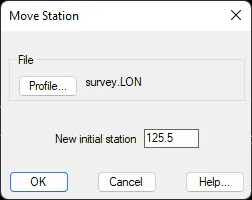
Example: Long section before and after applying a station adjustment of +125.5 m
0.000 42.559 | 125.500 42.559 |
|---|---|
10.000 42.637 | 135.500 42.637 |
20.000 42.145 | 145.500 42.145 |
30.000 42.232 | 155.500 42.232 |
40.000 42.749 | 165.500 42.749 |
50.000 45.237 | 175.500 45.237 |
60.000 47.655 | 185.500 47.655 |
70.000 49.836 | 195.500 49.836 |
80.000 51.061 | 205.500 51.061 |
90.000 52.716 | 215.500 52.716 |
94.279 52.400 | 219.779 52.400 |
This utility creates a backup file of the original profile, to which it assigns the same name and .BAK extension. Therefore, if a mistake is made when this command is used, the modified profile file can be changed, and the copy renamed.