tcpMDT
Merge Long Sections - MDT26
Merge Long Sections
 | Command to execute in the CAD |
|---|---|
Vertical menu | MDT26 > Profiles > Utilities > Merge Long Sections |
Ribbon menu | L.Sections > Utilities > Merge Long Sections |
Command line |
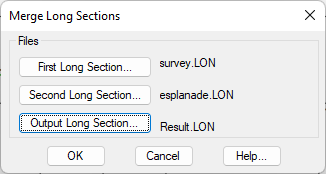
This command facilitates merging two long sections for which the program requests, via the below window, the two profiles to merge and the profiles file where the resulting profile will be saved.
As a result, the two files will be merged and ordered and saved in the selected output file.