
Support
Error "Sentinel key not found"
Error "Sentinel key not found"
Symptoms
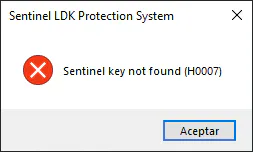
When attempting to run an MDT command, the following appears:
Applicable to
- Hardware or software protection keys with LDK technology
Main Cause
The Sentinel LDK runtime is not installed or is not functioning correctly.
Solution
Step 1: Verify runtime installation
Method A - Sentinel Admin Control Center: 1. In the Aplitop program group 2. Run Sentinel Admin Control Center
Method B - Web browser:
1. Open a browser
2. Go to: http://localhost:1947
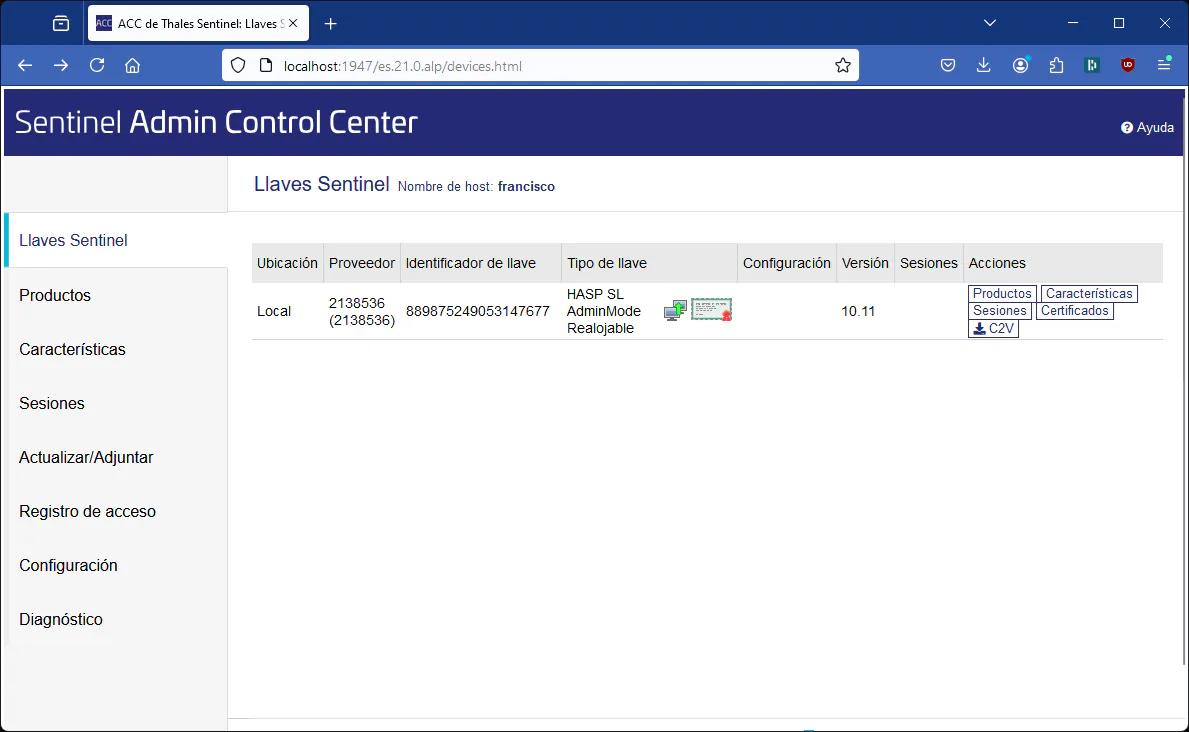
3. A page like this should appear:
Step 2: If the page does not appear
- Open FILE EXPLORER
- Go to the MDT25 installation folder:
- Remarks:
C:\Archivos de programa (x86)\Aplitop\MDT25 - Enter the Driver FOLDER
- Run HaspUserSetup.exe
- Follow the installer instructions
Step 3: Verify LICENSES
On the Sentinel Admin Control Center web page:
- Look for licenses with Provider: 2138536 (APLITOP)
- If you do not have licenses installed, you will see something like:

- Verify that a number greater than 8 appears in the Version column
Step 4: Verify the service
If it still does not work, perform a service verification: FAQ-14: How to verify the Sentinel service?
Additional Steps
If the problem persists after following all steps, contact Technical Support.
Category: Common Errors - Runtime not installed Classify points by levels: Intermediate Solution: Install/verify Sentinel runtime