
Support
Error "Feature not found"
Error "Feature not found"
Symptoms
When attempting to run an MDT command, the following appears:
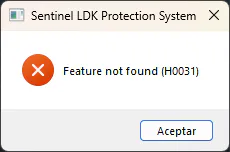
Applicable to
LDK-type hardware or software protection keys
Cause
The installed protection key corresponds to another Aplitop product, but is not for MDT 9/25/26.
Solution
Step 1: Verify the key
Check that you have connected or installed the correct key corresponding to MDT.
Step 2: Verify the product
Review your key documentation and confirm that it is licensed for MDT and not for other Aplitop products such as:
Point Cloud Editor
TcpSCANCYR
TcpTUNNEL
Step 3: Multiple keys
If you have multiple Aplitop keys: - Ensure that the one corresponding to MDT is connected - You can have multiple keys connected simultaneously - MDT will automatically search for the correct one
How do I identify my MDT key?
✅ Physically: Keys are usually labeled with the product name ✅ Via software: Run the corresponding diagnostic (see FAQ on checking)
Related
Category: Common Errors - Key identification Level: Basic Solution: Verify and connect the correct key