
tcpMDT
Add Cross Sections to Drawing - MDT26
Add Cross-sections to Drawing
 | Command to execute in the CAD |
|---|---|
Vertical menu | MDT26 > Cross-sections > Drawing > Add Cross Sections to Drawing |
Ribbon menu | X.Sections > Drawing > Insert |
Command line |
This option will allow us to draw a file of cross-section profiles on others that are already drawn.
This option is very useful, since it will allow us to add some profiles to others that we already have drawn and which we can have customized.
When you run the command, the following window will appear:
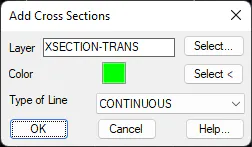
Layer: Layer on which the selected cross-section profiles will be drawn.
Color: Color of the cross-sectional profiles to be drawn.
Type of Line: The type of line associated with the profiles to be drawn.
Finally, it will ask us for the alignment of any of the profiles drawn and automatically the new cuts will be inserted.