
tcpMDT
Invert Cross Sections - MDT26
Invert Cross-sections
 | Command to execute in the CAD |
|---|---|
Vertical menu | MDT26 > Cross-sections > Edit > Invert Cross-Sections |
Ribbon menu | X.Sections > Edit > Invert Profiles |
Command line |
This option allows one to entirely transform a cross-section profile regarding its direction and sign, so that the initial station becomes the final station and the positions on the left go to the right and those to the right go to the left.
The program's command line first requests the types of change to be made.
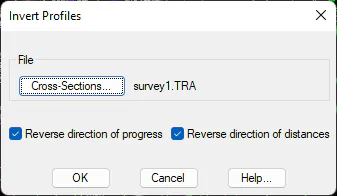
Reverse direction of progress: If this option is activated, we reverse the rest of cross-section profiles so that the first cross-section cut will become the last, and the last the first, the second the penultimate, and so on consecutively.
Reverse direction of distances: In this case, if this box is checked, all the cuts are reversed so that what was on the left is now on the right of the alignment and vice versa.
Example: Cross-sections before and after being inverted
0.000 -18.520 43.887 TRI 0.000 -19.677 49.094 TRI
0.000 -12.750 44.291 TRI 0.000 -11.611 48.129 TRI
0.000 -8.769 44.612 TRI 0.000 -3.462 47.503 TRI
0.000 0.000 45.318 EJE 0.000 0.000 48.201 EJE
20.000 -17.105 44.611 TRI 0.000 5.009 47.678 TRI
20.000 -16.140 44.670 TRI 0.000 9.458 44.159 TRI
20.000 -11.339 44.055 TRI 0.000 14.961 43.283 TRI
20.000 -3.832 45.434 TRI 20.000 -9.316 46.121 TRI
20.000 9.316 46.121 TRI 20.000 3.832 45.434 TRI
40.000 -14.961 43.283 TRI 20.000 11.339 44.055 TRI
40.000 -9.458 44.159 TRI 20.000 16.140 44.670 TRI
40.000 -5.009 47.678 TRI 20.000 17.105 44.611 TRI
40.000 0.000 48.201 EJE 40.000 0.000 45.318 EJE
40.000 3.462 47.503 TRI 40.000 8.769 44.612 TRI
40.000 11.611 48.129 TRI 40.000 12.750 44.291 TRI
40.000 19.677 49.094 TRI 40.000 18.520 43.887 TRI