
tcpMDT
Create from Several Alignments - MDT26
Create from Several Alignments
 | Command to execute in the CAD |
|---|---|
Vertical menu | MDT26 > Cross-sections > Create from Several Alignments |
Ribbon menu | X.Sections > Create > Cross Sections of Several Alignments |
Command line |
This command works similarly to the command Get Cross Sections with the difference that it generates several cross-sections with the same characteristics (interval, width ...) from the different horizontal alignments existing in the drawing.
Initially, after executing the command, the following window is displayed for managing the horizontal alignments from which we wish to obtain the profiles. The window is automatically filled in with the active project horizontal alignments and if there is no active project, it is filled in with the horizontal alignments existing in the drawing.
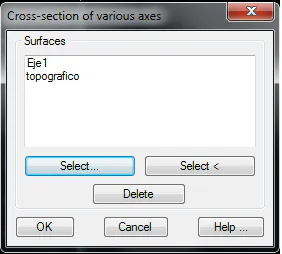
Select: The possibility to select a new horizontal alignment from a file
Select <: Select a new horizontal alignment designating it on the current drawing.
Delete: Deletes the horizontal alignment that is currently selected in the list.
Once the window is validated, a cross-section is created for each horizontal alignment with the name specified in the window and using the name of the horizontal alignment from it has been generated from as a suffix.