
tcpMDT
Filter Cross Sections by Stations - MDT26
Filter Cross Sections by Stations
 | Command to execute in the CAD |
|---|---|
Vertical menu | MDT26 > Cross-sections > Edit > Filter Cross-Sections by Stations |
Ribbon menu | |
Command line |
This tool will allow us to generate a cross sections file with a certain interval or previously specified stations. It will be very useful if we have some cross sections with a very small pk interval and we want to create a new one, but with a greater interval for study or drawing.
Initially it will ask us for the cross sections file from which to apply the filter and then the following window will appear in which we will specify the stations to be included in the new cross sections file.
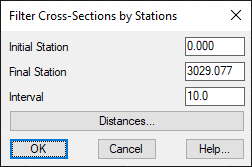
Initial Station: Station from which to obtain the stations to be included in the new cross sections file.
Final Station: Station up to which to obtain the stations to include in the new cross sections file.
Interval: Range of stations to include from the initial station.
Distances: Possibility to include specific stations.