
tcpMDT
Cross Sections. Move Stations - MDT26
Move Stations
 | Command to execute in the CAD |
|---|---|
Vertical menu | MDT26 > Cross-sections > Edit > Move Station |
Ribbon menu | X.Sections > Edit > Move Station |
Command line |
This option allows one to modify the stations or distances to the origin of a cross-section file. After selecting the file to be modified, the program requests a new Initial Station. If one enters a number other than the one proposed, the program takes it as the origin and changes all the values in the file's first column.
When the command is executed, the following dialog box is displayed. One enters the Origin and Destination files, together with the New Initial Station to be applied.
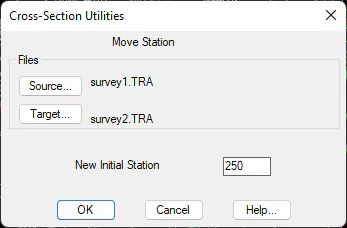
MDT automatically creates a backup file of the original file, with the same name and a .BAK extension.
Example: Cross-sections before and after applying a station adjustment of +250.0 m
0.000 -18.520 43.887 TRI 250.000 -18.520 43.887 TRI
0.000 -12.750 44.291 TRI 250.000 -12.750 44.291 TRI
0.000 -8.769 44.612 TRI 250.000 -8.769 44.612 TRI
0.000 0.000 45.318 Alig 250.000 0.000 45.318 Alig
20.000 -17.105 44.611 TRI 270.000 -17.105 44.611 TRI
20.000 -16.140 44.670 TRI 270.000 -16.140 44.670 TRI
20.000 -11.339 44.055 TRI 270.000 -11.339 44.055 TRI
20.000 -3.832 45.434 TRI 270.000 -3.832 45.434 TRI
20.000 9.316 46.121 TRI 270.000 9.316 46.121 TRI
40.000 -14.961 43.283 TRI 290.000 -14.961 43.283 TRI
40.000 -9.458 44.159 TRI 290.000 -9.458 44.159 TRI
40.000 -5.009 47.678 TRI 290.000 -5.009 47.678 TRI
40.000 0.000 48.201 Alig 290.000 3.462 47.503 TRI
40.000 3.462 47.503 TRI 290.000 11.611 48.129 TRI
40.000 11.611 48.129 TRI 290.000 19.677 49.094 TRI