tcpMDT
Trim Cross Sections - MDT26
Trim Cross-sections
 | Command to execute in the CAD |
|---|---|
Vertical menu | MDT26 > Cross-sections > Utilities > Trim Cross Sections |
Ribbon menu | X.Sections > Utilities > Cut Profiles |
Command line |
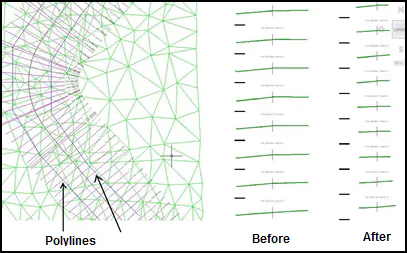
This command facilitates trimming each of the cuts of a cross-section file using the set of polylines in ground plan as a reference. It can be useful for areas in which the profiles overlap so that these may be trimmed without needing to regenerate them with the overlap accounted for.
In areas with no cut polyline the cross-sections are maintained intact as they were originally generated.
When initiated, first it will request the cross-section file we wish to modify, then the horizontal alignment and then the set of polylines.
Last, the program will request a new file for saving the trimmed profiles.