
tcpMDT
Extend Cuts - MDT26
Extend Cuts
 | Command to execute in the CAD |
|---|---|
Vertical menu | MDT26 > Cross-sections > Edit > Extend Cuts |
Ribbon menu | X.Sections > Edit > Extend Cuts |
Command line |
This tool allows one to extend the ends of the cross-section's cuts from the horizontal alignment to the distance desired.
When the command is executed, the program requests the cross-section file in addition to the initial and final stations affected by the changes to be made. The following window is then displayed, where one configures the method that will be used to extend the cuts.
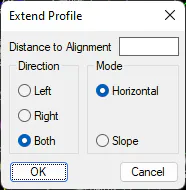
Direction: One selects the side towards which one intends to extend the profile. Either to the Left, Right or Both sides.
Mode: Method to be used to extend the cuts.
Horizontal: Assigns the previous or next vertex elevation.
Slope: Assigns the elevation extrapolated from the two previous or next vertices.
Lastly, the program requests a new cross-section file in which the changes made will be saved.