tcpMDT
Properties - MDT26
Properties
 | Command to execute in the CAD |
|---|---|
Vertical menu | MDT26 > Cross-sections > Properties |
Ribbon menu | X.Sections > Utilities > Properties |
Command line |
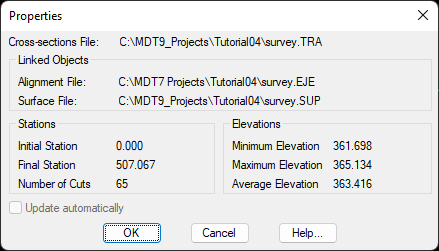
This option will allow us to visualize the characteristics of a drawn cross section. Additionally, we have the possibility to indicate if the selected cross sections will be updated automatically in the case of modifying the surface or alignment from which they were generated.
When selecting this command, it will ask us for any axis of the drawn profiles. Once selected, the following window will appear with the detailed information.