
tcpMDT
Contours - MDT26
Contours
Allows one to configure the parameters used in tools to generate and process contour lines.
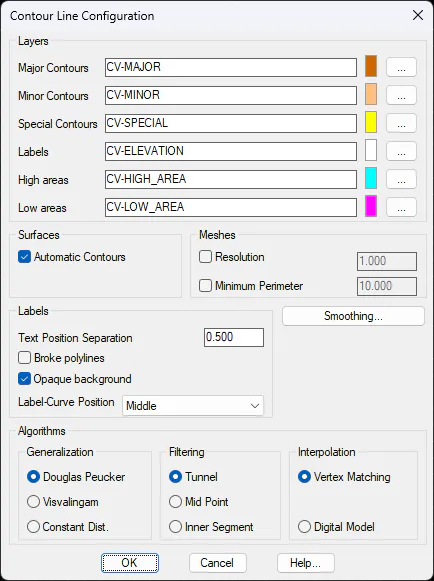
Layers
Major Contours: Name of the major contour lines layer.
Minor Contours: Name of the minor contour lines layer.
Special Contours: Name of contours drawn at some given height.
Labels: Name of layer used to draw the contours labels from specific commands.
High areas (CV-HIGH_AREA): Name of the layer in which the high areas of the terrain are represented, when drawing the contour lines.
Low areas (CV-LOW_AREA): Name of the layer in which the high areas of the terrain are represented, when drawing the contour lines.
Meshes
Resolution: When this option is activated, in the event the resolution of the grid is less than the established value, the value defined in this box will be used as the resolution.
Minimum Perimeter: When executing a contour line from grids, the closed contour lines generated will be discarded when their perimeter is less than that established in this settings value.
Labels
Text Height Multiplier (1.5): Factor by which the current text height is multiplied for the situate height command.
Text Position Separation (0.5): Separation between the contour lines and the text in labels.
Opaque background: If this check box is selected, when labeling a contour line the text with the elevation includes an opaque box with the color of the background, which hides the rest of the entities, so that the text is more readable.
Algorithms
This box allows users to choose among the different algorithms to be used in the cartography editing tools.
Generalization (Douglas-Peucker). Allows one to choose the algorithm to be used in the Contour Lines > Generalization command among: Douglas-Peucker, Visvallingam and Constant Distance.
Filtering (Tunnel). Allows one to choose the algorithm to be used for the Contour Lines > Filtering command among: Tunnel, Average Point and Inner Segment.
Interpolation (Vertex Matching). Allows one to choose the algorithm to be used for the Contour Lines > Interpolate Contours command.
Smoothing
Automatic Contour: Indicates whether the contour lines will be automatically modified when the points or the triangulation are changed.
Opens a dialog box which allows users to choose the contour line smoothing algorithm.
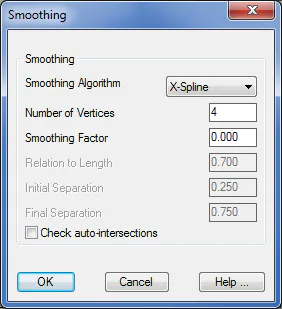
Smoothing Algorithm (TCP): Offers two methods to smoothen contour lines, TCP and X-Spline.
Number of Vertices (4): Parameter only used for the X-Spline algorithm.
Smoothing Factor (3.0): Indicates the smoothing factor used for contour lines. Admissible values are between 1.0 and 10.0.
Relation to Length (0.7): Reserved parameter that affects the smoothing of contour lines.
Initial Separation (0.25): Determines position relative to the contour's first inflection point.
Final Separation (0.75): Determines the position relative to the contour's second inflection point.