tcpMDT
Updates - MDT26
Updates
For users with valid support subscription, MDT can check if there are available updates. If you disable Download Updates check box, this feature will be disabled.
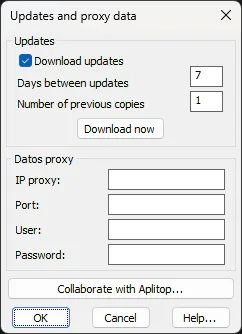
You can control how often the program checks for new updates. Also, you can set up how many old updates are stored, so that it will be possible to remove the last changes to the program. With the Download now button you can now manually download the latest available update, without checking if it is more modern than the program you are currently using.
When the program downloads an update, it waits until the user close CAD session. Then it asks if you want to install the update. If you accept the installation is launched and user has to wait for the CAD session fully terminate before proceeding with the installation.
In the event the license has no maintenance agreement, a message will appear informing us of this situation, and in which case it will be impossible to configure the updates.
In this dialog we can also configure in case of accessing the Internet through a Proxy, the necessary data such as the IP, the Port, the User and the Password, this information will be used by the application for all those commands that need to access the Internet such as the download of web services WMS, WCS ... etc.
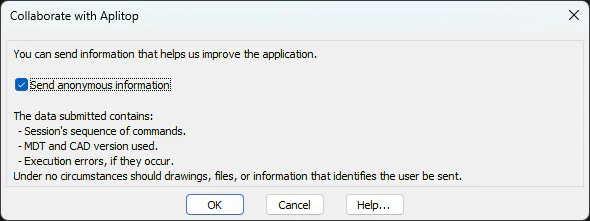
Colaborate with Aplitop
This button displays a window where you can configure the sending of anonymous information about the use of the program.