
tcpMDT
Points - MDT26
Points
Allows one to modify the parameters affecting the commands used to handle surveying points.
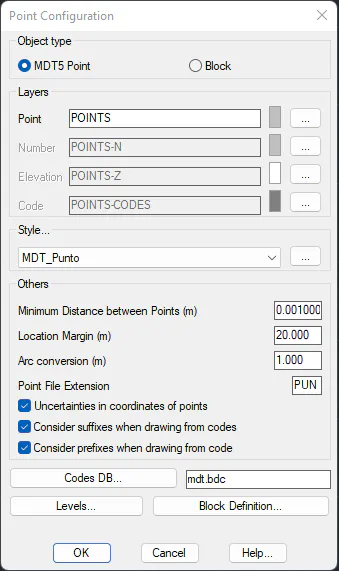
Object Type
Sets the point type with which MDT will work.
MDT5 Point: Proprietary object that MDT incorporates into CAD.
Block: The point is drawn as a block. It is similar to the existing block in MDT version 3.
Points Layer
Allows one to name a layer where the point blocks are inserted. It is also possible to select one from the layers list existing in the drawing by clicking on the Select button.
Style
Select the text style of the attributes associated to the point: Number, Height and Code.
Others
Minimum Distance between Points (0.001): Distance value between points below which they are considered to be repeated, expressed in meters.
Location Margin (20.0): Screen representation margin in the localize points command, expressed in meters.
Arc Conversion (1.0): Interval to create the points in a polyline's arc segments, expressed in meters.
Point File Extension: Default extension the program will work with for the points file.
Uncertainties in Coordinates of Points: Enables us to activate and deactivate the use of uncertainties in the management of points and in the calculation of surfaces. The confidence level is defined in the Surveying Configuration Least Squares section.
Consider suffixes when drawing from codes: If this option is enabled, suffixes are considered in the drawing from codes.
Consider prefixes when drawing from codes: If this option is enabled, prefixes are considered in the drawing from codes.
Codes DB: Point codes database that program will use by default. We can select a different one from this option.
Levels
This button gives access to a dialog box that allows point levels to be added, deleted or modified.
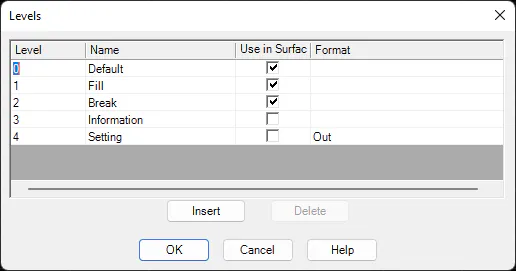
Change: Allows one to modify the level selected.
Insert: Adds a new level.
Delete: Deletes the level selected.
Consult the meaning of each field in the chapter on Surveying Points in the Reference Manual.
Block Definition
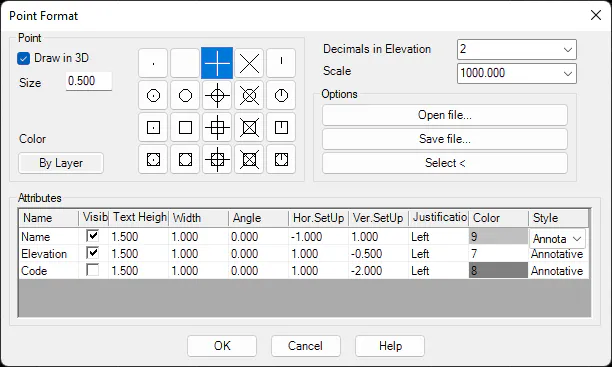
The parameters used to represent points on screen can be configured in this box. Parameters such as relative position of each block element with regard to the point, justification, text style, etc. can be changed. See the Points > Utilities > Points Configuration command for further details.