
tcpMDT
Elements - MDT26
Elements
The parameters that determine alignment behavior are as follows:
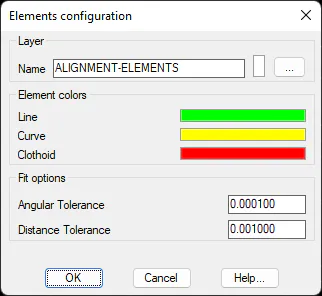
Alignment Layer (ALIGNMENTS). Allows one to name the layer where alignments will be drawn. The name can be entered in the relevant text box or selected from a list of existing layer names by clicking on the Select button.
Element Colors: The program allows users to draw straight lines, curves and clothoids with different colors in order to identify the dimensions of each element more easily. By clicking on the box associated to each type, a specific color can be chosen. It can also be done BY LAYER if one does not wish to specify a particular color.
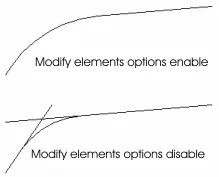
Modify Elements (On): By activating this option, the element drawing commands in the alignment's menu modify the road design elements used as a reference to ensure the set maintains its continuity.
Angular Tolerance (0.0001): Maximum tolerable difference between the azimuth of two consecutive road design elements, so that the azimuth is considered as continuous.
Distance Tolerance (0.001): Maximum tolerable distance between the initial and final points of two consecutive road design elements. Elements having a greater separation than this parameter cannot be grouped together nor be converted into alignments.