
tcpMDT
Widenings - MDT26
Widenings
Shows the parameters that affect the calculation and representation of additional widths. See the Segments > Widenings > Generate Widenings command for further details.
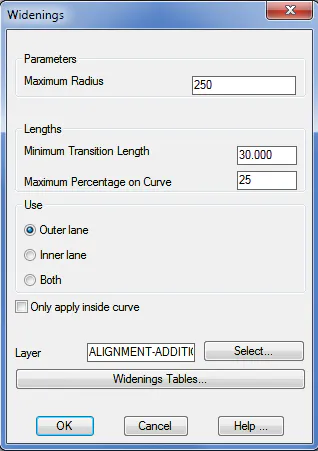
Maximum Radius (250): Maximum widening application radius in curved sections expressed in meters.
Minimum Transition Length (30.0): Desirable length of transition between curve and line in meters.
Maximum Percentage on Curve (25): Maximum widening percentage that can be achieved in circular curve.
Application point: We indicate the application point of the widening.
Outer Lane: The widening is applied in the most outside lane type vector of the section.
Inner Lane: The widening is applied in the lane type vector nearest to the section alignment.
Both: The widening is applied in both lanes.
Only apply inside curve: If we activate this box the widening will only apply to the inner curve vectors.
Layer (ALIGNMENT-WIDENINGS). Allows one to select the layer where widenings are drawn.
Widenings Table
This section enables us to change, insert or remove the different widenings tables available in accordance with the regulations of the country selected.
The following window will appear:
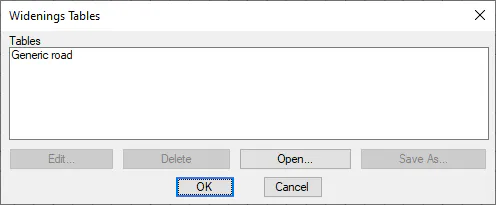
Edit: We can edit any of the tables selected. This option executes the Widenings > Widenings Table command.
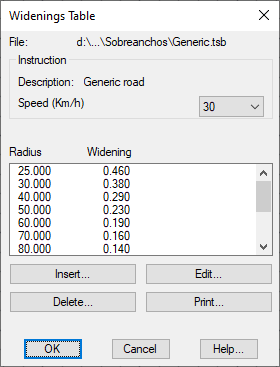
Delete: Removes the table selected. It should be pointed out that on executing this option the file corresponding to the table selected will be deleted and cannot be recovered.
Open: Enables us to insert a new widenings table stored in another location.
Save as: Enables us to save the table selected in another file with a different name. This option is extremely useful when the new table to be created is similar to an existing table.
