
tcpMDT
Add Codes - MDT26
Add Codes
 | Command to execute in the CAD |
|---|---|
Vertical menu | MDT26 > Points > Codes > Add Codes |
Ribbon menu | Points > Edit > Add Codes |
Command line |
This command allows one to assign one or several codes to a specified set of points. In order to do so, once the set of points chosen has been selected, the code to be specified is selected. After validating it, the following dialog box is displayed.
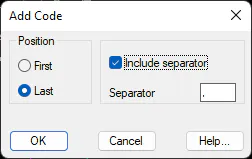
One specifies the new code's position in the point --either at the beginning or at the end of point set codes-- in this window. One additionally, determines the possible inclusion of a separator between individual codes, allowing one to enter the most suitable separator.
For instance, if a point has the ST510 code assigned to it and one has selected it in order to add the PT code at the end with a comma separator, the new code will be ST510,PT.
These codes can be deleted using the Points > Codes > Remove Codes command.