tcpMDT
Convert 3D Faces - MDT26
Convert 3D Faces
 | Command to execute in the CAD |
|---|---|
Vertical menu | MDT26 > Points > Create Points > Convert 3D Faces |
Ribbon menu | Points > Create > Convert 3D faces |
Command line |
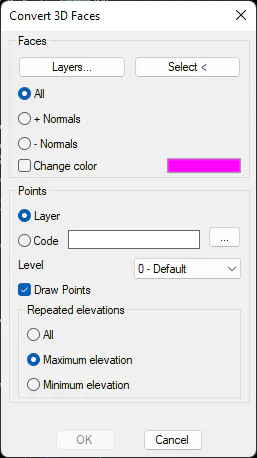
In addition to Convert Drawing Objects command, when converting 3D Face type entities, this command provides a more specific option of this particular case. First, you can select a set of entities or a list of layers in which to search for 3D faces. You can then choose whether to convert all faces, or only faces whose normal has a positive or negative sign. In 3D graphics applications, the following criteria are typically used when modelling a 3D object. If a face has the positive normal, it is a face that represents a plane that is visible only from above. Similarly, if the normal is negative, the plane is visible from below. In drawings that follow this criterion, with this option you can choose whether to convert the top or bottom surface of an object to points.
Rest of options allow you to assign a code and level to the new points to be created, as well as if you want to represent the points.
Finally, for points that match in X,Y coordinates, you can decide whether to draw the point with the highest elevation, the point with the lowest elevation, or both. With this last option, you can then manually move one of the points, so that both can then be used when creating a surface. If multiple points with the same X,Y are maintained, only one of them will be used on the surface.