
tcpMDT
Convert Attributes to Texts - MDT26
Convert Attributes to Texts
 | Command to execute in the CAD |
|---|---|
Vertical menu | MDT26 > Points > Create Points > Convert Attributes to Text |
Ribbon menu | Points > Export > Attributes to Texts |
Command line |
This tool allows one to convert the points' attributes into conventional texts, so that they can be handled as such making it easier and more flexible to work with them than with the normal attributes.
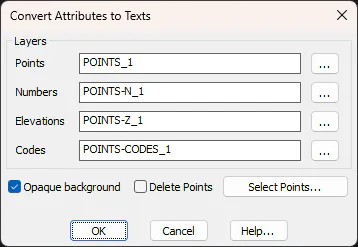
The dialog box allows one to specify the layers where the Points and the Numbers, Elevations and Codes attributes will be drawn. You can set texts to have an Opaque background to make them easier to read, ant the original point can be deleted from the drawing after the texts are created by activating the Delete Points check box.
If not indicated otherwise, this command works with all the drawing's points. By clicking on the Select Points button, one can enter a set of arbitrary points to convert their attributes.