
tcpMDT
Enter Points - MDT26
Enter Points
 | Command to execute in the CAD |
|---|---|
Vertical menu | MDT26 > Points > Create Points > Enter Points |
Ribbon menu | Points > Create > Enter |
Command line |
This command allows one to insert points manually in a successive and continuous fashion using a points list, so that one can view them in the window. It also allows users to check the list.
The Enter Points window is displayed by using this command. Firstly, it is advisable to activate the fields one intends to fill in: Number, Level, X Coordinate, Y Coordinate, Z Coordinate or Code, so that it is not necessary to fill in the set boxes, such as the code, level etc..... If the number option is deactivated, one automatically increases each point inserted by one unit, starting from the last point existing in the job.
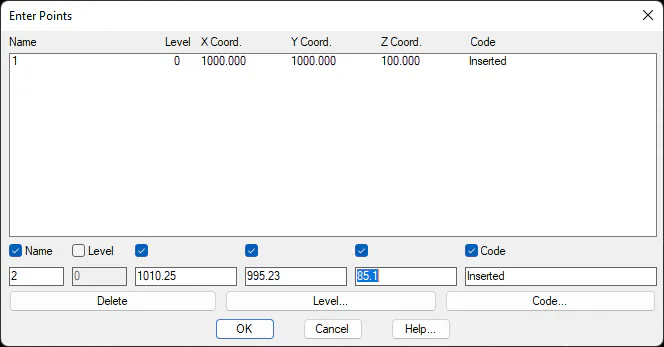
One can delete the point selected by using the Delete button. To edit point that has already been entered, the point in question should be double clicked.
The Level and Code buttons allow one to know the job's existing levels and codes, so that they can be selected in the appropriate windows.